
Underwriting math that shows its work
Built for affordable housing developers across the United States, Site Feasibility brings unit mix, operating assumptions, debt, equity, and cash flow into one LIHTC proforma. Finalize your model, then carry its mapped numbers into a supported application template without entering them twice.
Spreadsheets don't know when a number goes stale
A LIHTC proforma has to get rent limits, utility allowances, impact fees, debt sizing, tax credit equity, and agency scoring all correct at once — and most of that still lives in a workbook someone builds once and re-uses until it breaks.
- Rent limits, utility allowances, and impact fees get copied into a spreadsheet once and go stale the next time HUD or the jurisdiction updates them.
- DSCR, LTC, and LTV debt-sizing tests are usually run separately, by hand, instead of automatically picking whichever one actually binds.
- Tax credit equity pricing — especially a state credit's own shorter, differently-timed credit period — is easy to get wrong copying a federal formula sideways.
- Agency scoring requirements often live apart from the financial model, making it harder to compare affordability, financing, and application readiness.
Eight tabs, one real engine
The same deal, priced consistently, from unit mix to a scored scenario.
Unit mix
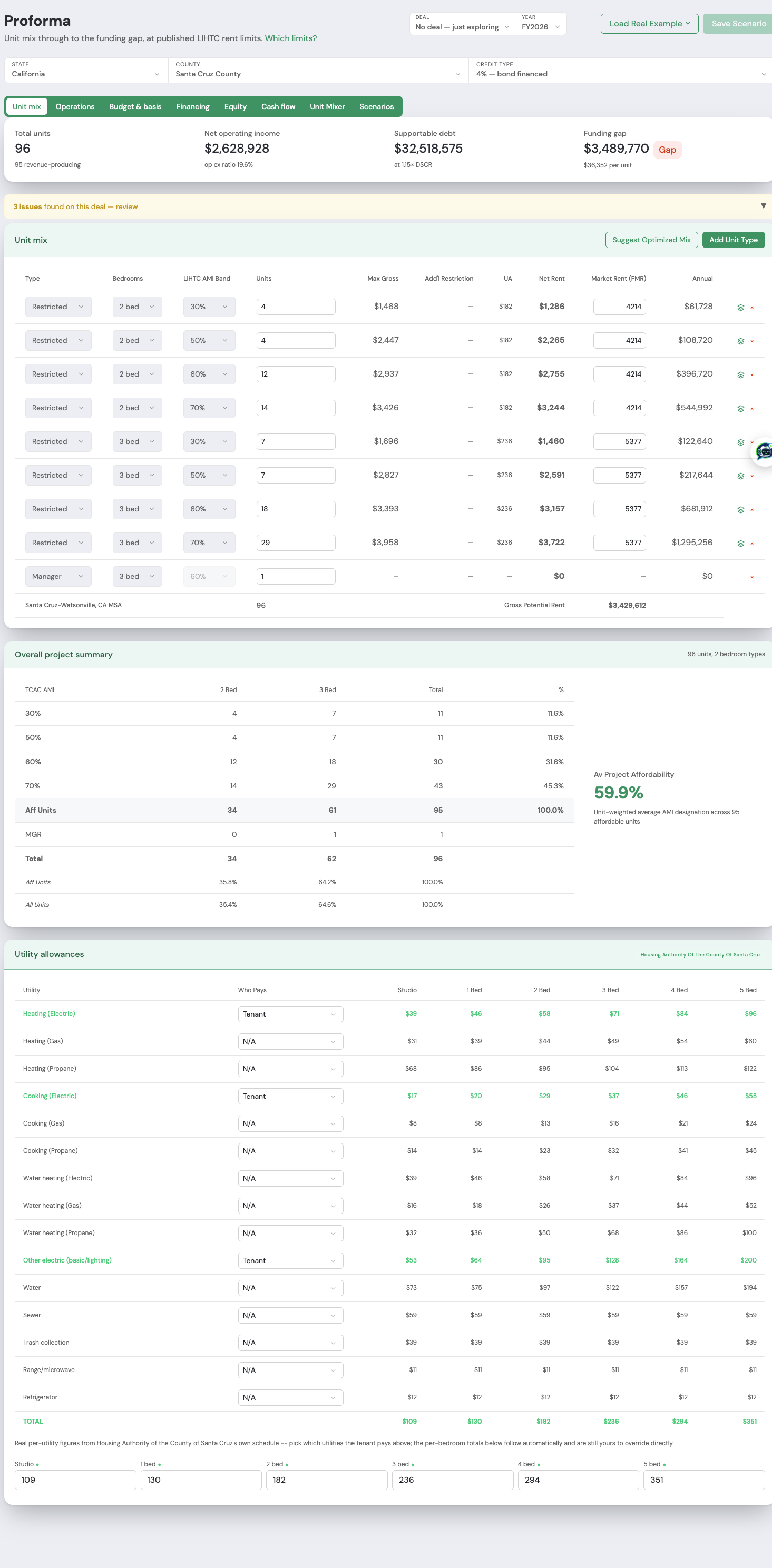
Set unit count, bedroom mix, and AMI designations. Rents and utility allowances pull from the real per-county HUD/utility-allowance schedule for the deal's own jurisdiction, not a table you maintain by hand.
Operations
Build the operating statement — gross potential rent, vacancy, operating expenses, reserves — into a real net operating income figure the same way a lender reads it.
Budget & basis
Build a development budget and separate eligible, adjusted, and qualified basis. Use jurisdiction-specific impact fee data where available, with California threshold basis checks in the supported state workflow.
Financing
Size supportable debt against DSCR, LTC, and LTV, and see which constraint governs the result. Review financing assumptions against your lender and allocating agency's requirements.
Equity
Model federal LIHTC equity, developer fee deferral, and bond-financing assumptions alongside your other sources. The California workflow also supports state tax credit equity and CTCAC-specific developer fee rules.
Cash flow
A multi-year cash flow projection, up to 40 years, so deferred-fee payback and reserve draws are visible across the deal's real holding period — not just year one.
Unit Mixer
Compare unit counts, AMI elections, and capital structures through the same proforma engine. Rank financial outcomes, with agency scoring available for supported programs.
Scenarios
Test credit-price and interest-rate sensitivity and compare AMI mixes under your set-aside constraint. California scenarios include CDLAC/CTCAC scoring alongside the financial model.
Build the proforma once.
Put those numbers to work twice.
Once you have reviewed and finalized your proforma, carry its mapped financial data into your application. Spend less time re-entering numbers and more time preparing a strong submission.
Finalize your model
Review the unit mix, budget, financing, and cash flow. Save the scenario to your project.
Populate your application
Link the same project and select Populate from Proforma to bring mapped values into the supported template.
Review and export
Check the transferred fields, complete the remaining application details, and export the workbook for review.
Read the walkthrough
Load a built-in real example. Review its unit mix, assumptions, and budget, then save the scenario to a project. Create an application linked to the same project and select Populate from Proforma. This example transferred 77 mapped fields. Add project identification, review the populated unit rows, and export the application workbook. Street address and ZIP are marked as unspecified demo details. Remaining fields and supporting documents must be completed before submission.
Real results
All eight Proforma tabs, captured from a potential project proforma. Open a screenshot and scroll through the complete page. Illustrative results depend on the selected assumptions.
THE PROFORMA / SITE FEASIBILITY
One connected model.
Less work between steps.
Build your unit mix once. Follow rent into operating income, size debt against the model’s constraints, and carry mapped values into a supported application when your proforma is finalized.
Gross rent less utility allowance feeds the operating model.
Compare DSCR, loan-to-cost, and loan-to-value constraints. Review the resulting payment and balloon.
Actual controls from a potential project proforma. Review inputs for your jurisdiction.
Build a mix around the project you are evaluating.
Carry rent assumptions into operations and financing.
Transfer mapped values to the supported CTCAC 4% template; review and complete remaining fields.
Explore all full tool screenshots
National research. Local assumptions.
Use federal data and state guidance together. Local fee schedules, utility allowances, automated scoring, and application templates vary by jurisdiction.
HUD income and rent limits
Published HUD Multifamily Tax Subsidy Project (MTSP) rent limits and area income limits, pulled per county — not a table someone re-types every spring.
Per-housing-authority utility allowances
The actual schedule published by the housing authority with jurisdiction over the site, broken out by utility and bedroom count — not a statewide average.
Jurisdiction-scoped impact fees
Real fee schedules keyed to the site's own city or county, auto-filled from the linked parcel's real acreage for fees priced per acre.
State QAP research and award history
Explore 56 state and territory QAP guides and 2,114 awarded LIHTC projects across 45 states. Research coverage is distinct from automated scoring, which depends on the supported program.
State-specific calculations
California tools include density bonus calculations, CTCAC threshold basis limits, and CDLAC/CTCAC scoring. Check the available tools and source dates for your project's jurisdiction.