
FROM YOUR MODEL TO YOUR APPLICATION
Build it once.
Carry the numbers forward.
Your proforma already contains the numbers. See how EZFeasi brings mapped data into a supported LIHTC application—so your team can focus on review instead of re-entry.
THE EXPORTED DOCUMENT
See the application workbook.
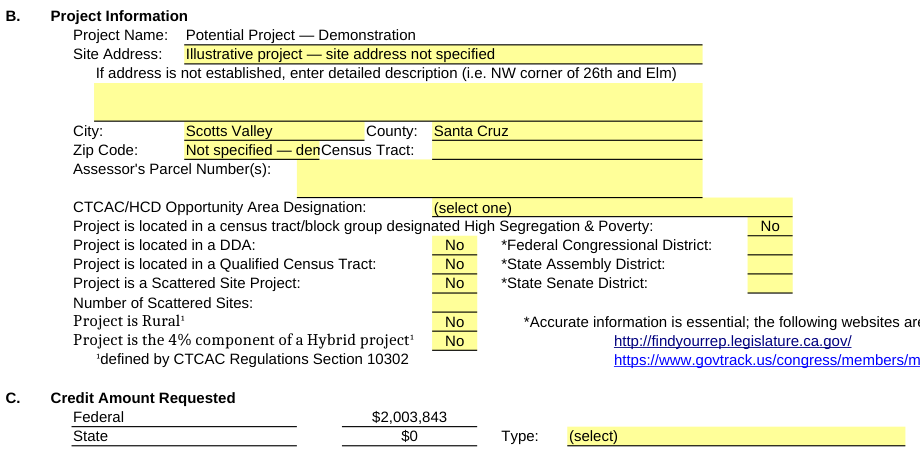
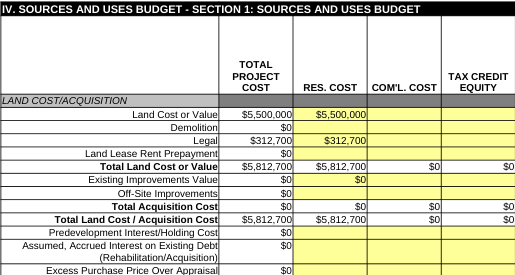
These are close-ups rendered from the actual exported Excel file. Blank fields remain for your team to complete.
WHAT YOU’LL SEE
From saved assumptions
to populated fields.
- 00:00
Open application data
Start with an application linked to the project’s saved proforma.
- 00:08
Populate from proforma
Bring mapped financial values into the supported template.
- 00:16
Review project identification
See the demonstration’s project details and clearly marked address placeholders.
- 00:24
Check the unit mix
Review populated unit counts, rents, utility allowances, and AMI levels.
- 00:32
Review financing
Inspect the transferred permanent financing assumptions.
- 00:40
Check operating expenses
Review the populated replacement reserve figure.
- 00:48
Inspect the development budget
See mapped costs in the sources and uses section.
- 00:56
Review basis and credits
Check the populated credit assumptions.
- 01:04
Export to Application
Zoom in on the export action.
- 01:12
View the exported application
Read project identification and the federal credit request in the actual workbook.
- 01:22
Inspect the exported budget
See land and legal costs populated in the sources and uses worksheet.